

|
Product Catalogue |
All in One PDF Writer 2.5
(Screenshots & Help File)
All in One PDF Writer is a pdf creator tool for create PDF files from all printable files and all images. It convert word to pdf, convert excel to PDF, convert ppt to pdf, convert image to pdf, convert xml to pdf etc without using Adobe Acrobat Software or other third party tool.
please contact us for: Custom PDF Solution
|
|
Step 1: Registration
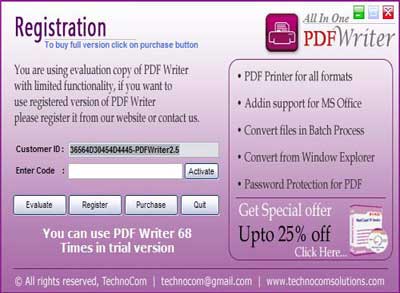
The screen shown as below will be display in the un-registered version every time.

figure 1.1
Register : for registering the "All in One PDF Writer v2.5" please send to us your "Customer Id" from the above window. After confirmation of payment we provide you an " Activation code" that register your "All in One PDF Writer v2.5".
Buy: you can payment for "All in One PDF Writer v2.5", please click "Purchase" button in the above window by paypal or send to us cheque/DD in favour of "Technocom" payable at Delhi.
Evaluation: using the trial version of "All in One PDF Writer v2.5" please click "Evaluate" button, it will provide you the limited functinality.
Activate: Please enter "Activation Code" which we provide you in the activation code text field and click Activate button. |
Download Links |
|
Info |
File Size
10.75 MB |
License
Purchase |
Limitation
100-uses trial |
Price
$ 24.95 |
Buy |
| |
|
Support |
|
We Accept |
|
| |
| |
| |
| |
| Top |
Step 2 : How to Use "All in One PDF Writer v2.5"
Batch Processing:
Add Files from all Path:
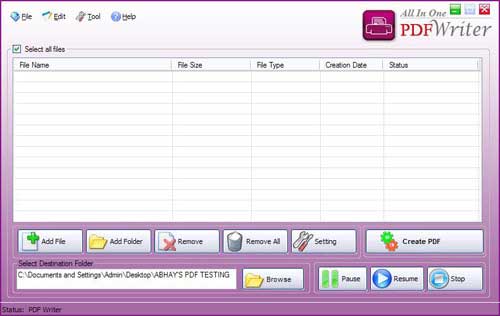
-
Run this All in One PDF Writer v2.5. figure1.2
-
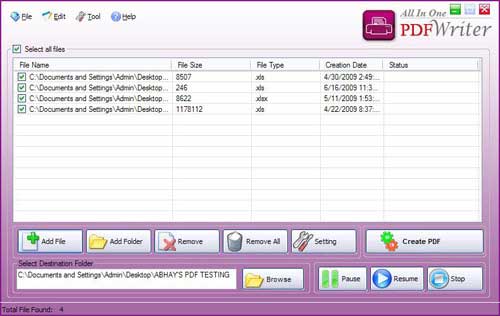
Add document files which you want to convert in pdf files, click "Add File" button. figure 1.3
-
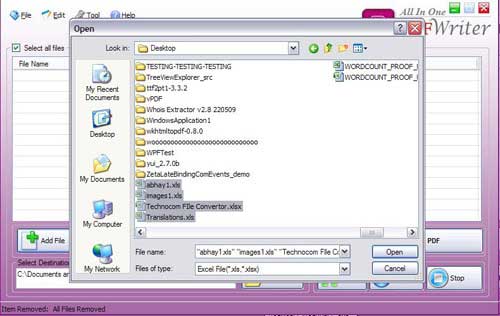
Select files from different files path. figure 1.4

figure 1.2

figure 1.3

figure 1.4
Add Files from all Path:
-
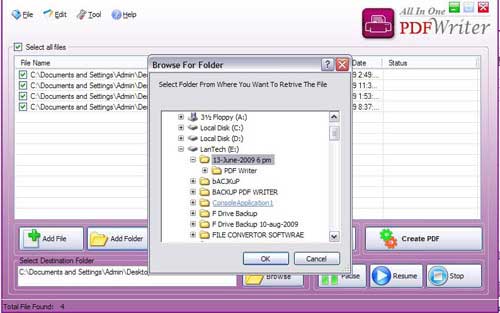
Add all files from a selected directory or folder. figure1.5
-
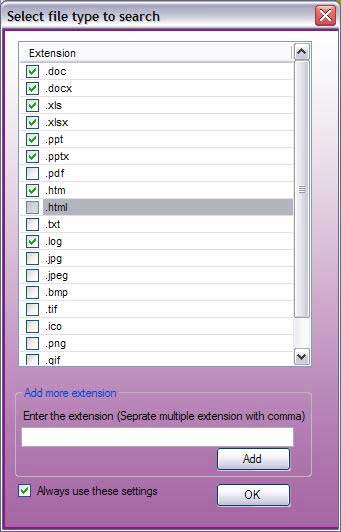
when you select a directory and click "ok" then a file type dialog will be shown as figure 1.6
-
select file types by their extension such as (.doc, .ppt, .docx, .xls etc) and you can add your own extension for the files search in the selected directory and click "ok" button.

figure 1.5 Top

figure 1.6 Top
It will fill all the files of selected file types from the selected directory as shown below, now you are ready to create PDF files from all selected files in the given list. if you want to change security settings, PDF default settings please see settings & security section.
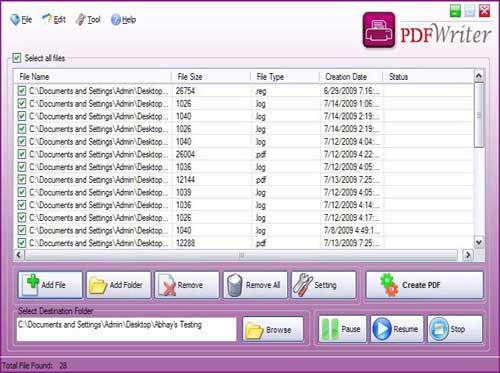
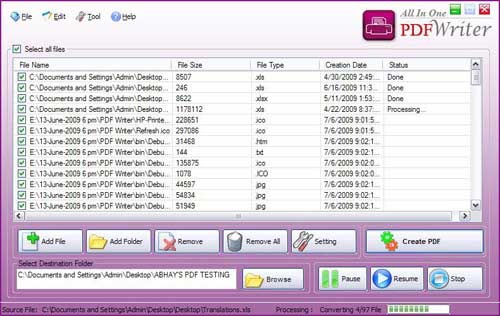
figure 1.7 Top

figure 1.8 Top
General Settings:
-
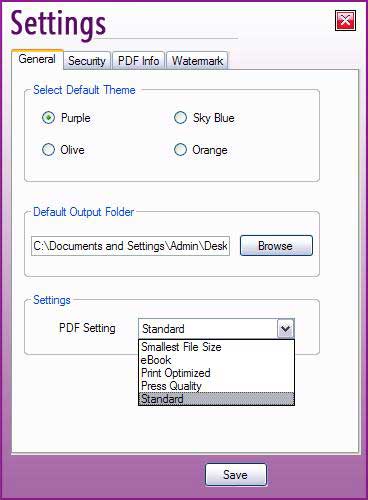
Click "Setting" button to open settings dialog figure1.9
-
Select "General" tab where you can select "Theme" option, set "Default output Folder", PDF file size settings. in figure 1.9

figure 1.9 Top
-
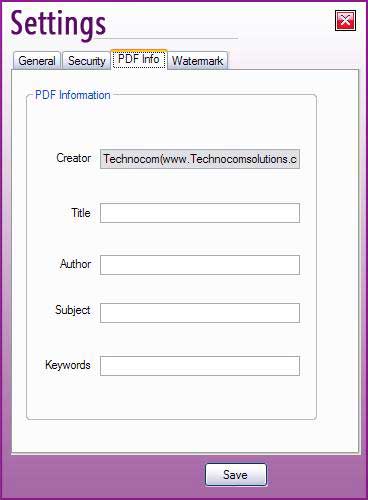
Select "PDF Info" tab where you can Add additional information for all PDF Files created by "All in One PDF Writer v2.5". figure 1.10
-
Add Creator Information, Title of PDF file, Author's Name, Subject and Keywords.

figure 1.10 Top
Security Settings:
-
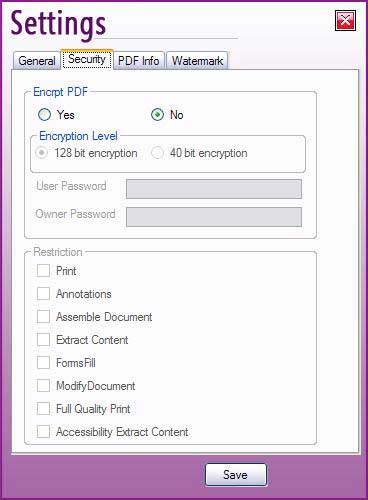
Select "Security" tab where you can select Encryption Level.
-
Set User Password and Owner Password.
-
Restrict from Printing, extract content from PDF files, Modify Document etc.

figure 1.11 Top
Water-mark Settings:
-
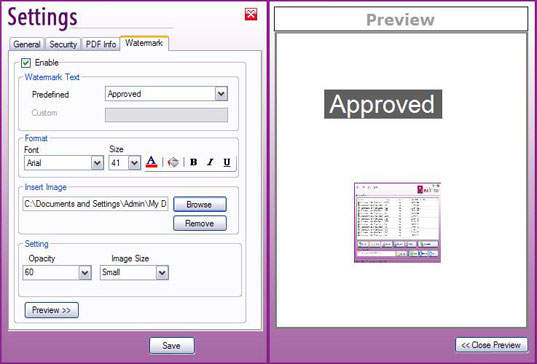
Select "Watermark" tab where you can select water-mark to insert in PDF files creation. There are 2 types of water-mark.
-
"Custom Text" as a water-mark.
-
Image as a water-mark.
-
You can select font settings, back color, fore color for text watermark and Image size for Image watermark. figure 1.12

figure 1.12 Top
MS Word To PDF:
-
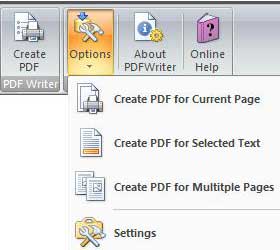
"All in One PDF Writer" is fully compatible with all versions of MS Office.
-
It creates ribbon in Word 2007 and Menu in Older Versions.
-
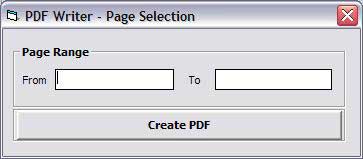
you can create PDF file of current page, selected text and multiple pages from open word document.
-
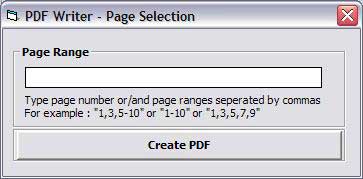
Create PDF file of open word document.figure 1.13 & figure 1.14

figure 1.13
you must pass the page range if you want to create a PDF file of selected page range.

figure 1.14 Top
MS Excel To PDF:
-
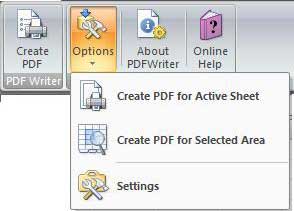
"All in One PDF Writer" is fully compatible with all versions of MS Office.
-
It "Create PDF" file for Active Sheet & "Create PDF" for Selected Area.
-
Create PDF file of open excel document.figure 1.15

figure 1.15
MS PowerPoint To PDF:
-
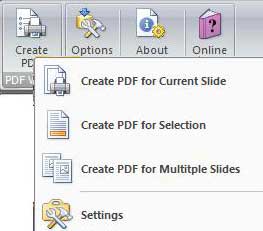
"All in One PDF Writer" is fully compatible with all versions of MS Office.
-
It "Create PDF for Current Slide".
-
It "Create PDF for Selection" in slide of PowerPoint file.
-
It "Create PDF for Multiple Slides" & slides range you have to pass in slide range dailog. figure 1.17

figure 1.16 Top

figure 1.17
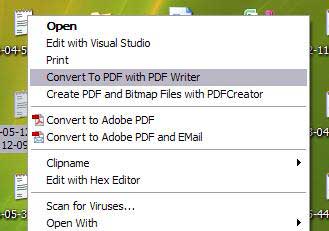
Create PDF File from Context Menu:

figure 1.18
|
|
|

|
|
Special Offer |
|
Customization |
|
Testimonials |
I bought Email Extractor 3.0 and it worked perfectly for me. This is the best and most affordable software on the Net.
~ Andrew Jones
Your software has increased my Excel capability tremendously and it is so cheap that I cannot believe it.
~ Susan
I was stuck with so many Emails on my Outlook and wanted to get all the Email addresses but was not finding the way out, Fortunately I found your unique software which could let extracts emails from my Outlook.
~ Dan Phillips
We wanted to clean many Excel files but it was time consuming and frustrating finally we got your software and it does the same in minutes. Thanks for your help.
~ Michael |
| |
| |
| |
| |
| |
| |
| |
| |
| |
| |
| |
| |
| |
| |
| |
| |
| |
| |
| |
| |
| |
| |
| |
| |
| |
| |
| |
| |
| |
| |
| |
| |
| |
| |
| |
| |
| |
| |
| |
| |
| |
| |
| |
| |
| |
| |
| |
| |
| |
| |
| |
| |
| |
| |
| |
| |
| |
| |
| |
| |
| |
| |
| |
| |
| |
| |
| |
| |
| |
| |
| |
| |
| |
| |
| |
| |
| |
| |
| |
| |
| |
| |
| |
| |
| |
| |
| |
| |
| |
| |
| |
| |
| |
| |
| |
| |
| |
| |
| |
| |
| |
| |
| |
| |
| |
| |
| |
| |
| |
| |
| |
| |
| |
| |
| |
| |
| |
| |
| |
| |
| |
| |
| |
| |
| |
| |
| |
| |
| |
| |
| |
| |
| |
| |
| |
| |
| |
| |
| |
| |
| |
| |
| |
| |
| |
| |
| |
| |
| |
| |
| |
| |
| |
| |
| |
| |
| |
| |
| |
| |
| |
| |
| |
| |
| |
| |
| |
| |
| |
| |
| |
| |
| |
| |
| |
| |
| |
| |
| |
| |
| |
| |
| |
| |
| |
| |
| |
| |
| |
| |
| |
| |
| |
| |
| |
| |
| |
| |
| |
| |
| |
| |
| |
| |
| |
| |
| |
| |
| |
| |
| |
| |
| |
| |
| |
| |
| |
| |
| |
| |
| |
| |
| |
| |
| |
| |
| |
| |
| |
| |
| |
| |
| |
| |
| |
| |
| |
| |
| |
| |
| |
| |
| |
| |
| |
| |
| |
| |
| |
| |
| |
| |
| |
| |
| |
| |
| |
| |
| |
| |
| |
| |
| |
| |
| |
| |
| |
| |
| |
| |
| |
| |
| |
| |
| |
| |
| |
| |
| |
| |
| |
| |
| |
| |
| |
| |
| |
| |
| |
| |
| |
| |
| |
| |
| |
| |
| |
| |
| |
| |
| |
| |
| |
| |
| |
| |
| |
| |
| |
| |
| |
| |
| |
| |
| |
| |
| |
| |
| |
| |
| |
| |
| |
| |
| |
| |
| |
| |
| |
|